
What quality audit configuration is
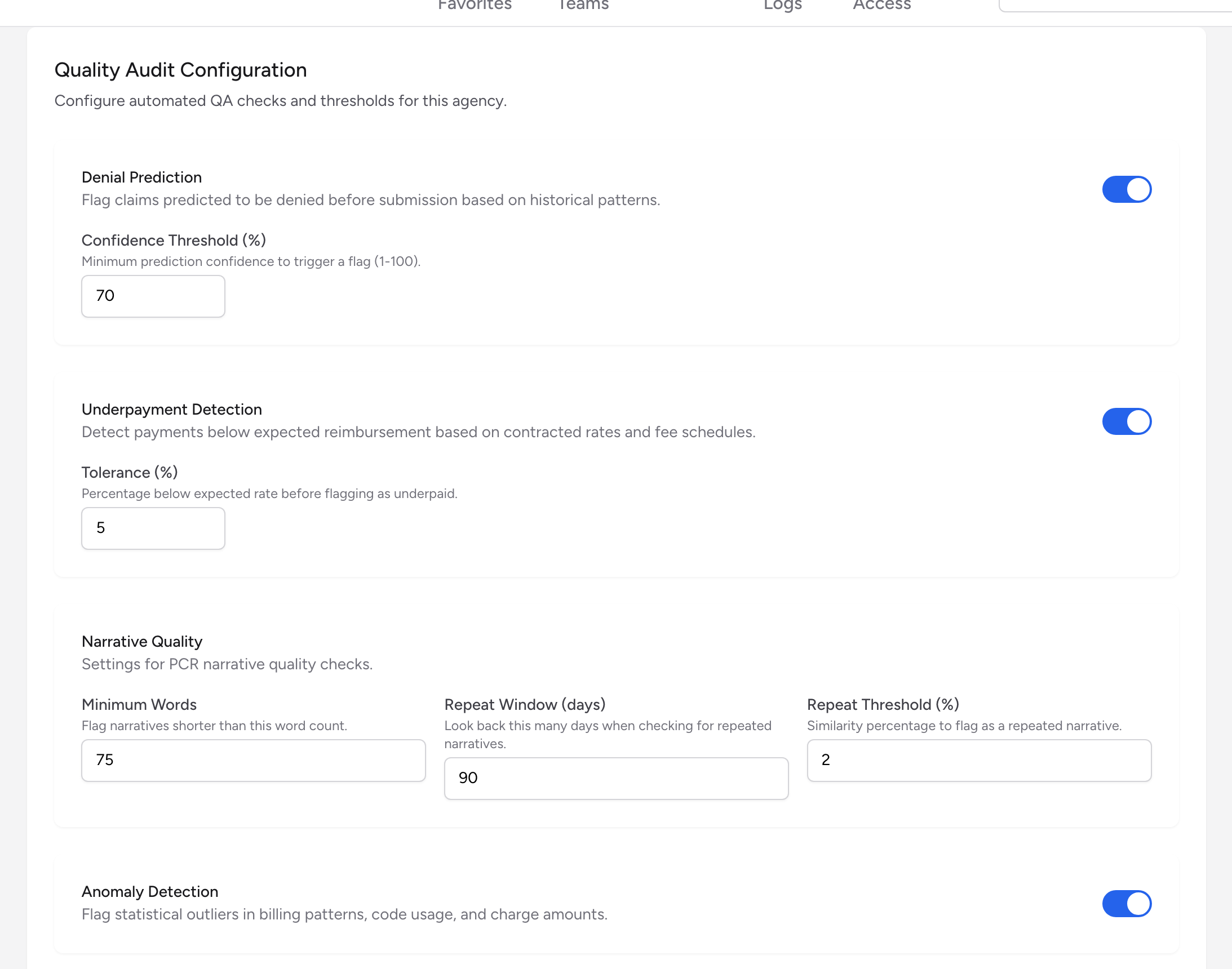
Billing runs a set of automated quality checks on each agency's claims and payments. The Quality Audit Configuration panel is where you turn each check on or off and set how sensitive it is. Anything a check finds becomes a flag on the QA work queue for your team to review.
These checks work entirely from the claim and payment data inside Billing. They need no outside connection, and Underpayment Detection reviews payments whether they arrive in remittance files or are posted by hand.
Before you start: Quality audit configuration lives in Settings, which only company admins can open. If you do not see Settings in the menu, ask your admin.
Where to find it
- From the menu, click Settings, then Agencies, and click View on the agency.
- Open the Quality Audit tab. Quality Audit Configuration is the first panel, above the QA Rules panel covered in QA rules.
The checks
Denial Prediction
Flags claims predicted to be denied before submission, based on historical patterns. Use the toggle to turn it on or off. When it is on, a Confidence Threshold (%) field appears: the minimum prediction confidence, from 1 to 100, needed to trigger a flag. It starts at 70, so a claim is only flagged when the prediction is at least 70% confident. Lower the number to catch more risky claims at the cost of more noise; raise it to see fewer, surer flags.
Underpayment Detection
Detects payments below the expected reimbursement, based on contracted rates and fee schedules. When it is on, a Tolerance (%) field appears: how far below the expected rate a payment can fall before it is flagged as underpaid. It starts at 5, so a payment more than 5% short of the expected amount gets a flag.
Narrative Quality
Checks the PCR narrative on each claim. Three settings control it:
- Minimum Words -- Flag narratives shorter than this word count. Starts at 75.
- Repeat Window (days) -- Look back this many days when checking for repeated narratives. Starts at 90.
- Repeat Threshold (%) -- The similarity percentage at which a narrative is flagged as a repeat of an earlier one.
Anomaly Detection
Flags statistical outliers in billing patterns, code usage, and charge amounts. This check is a simple on/off toggle with no threshold to set.
Saving your changes
Click Save Settings at the bottom of the panel. A "QA settings saved." message confirms the new thresholds are in place.
Example
Your QA work queue is filling up with denial-prediction flags, and most turn out to be fine. Open the agency's Quality Audit tab, raise the Denial Prediction Confidence Threshold (%) from 70 to 85, and click Save Settings. Now only the strongest predictions create flags, and your team spends its review time on the claims most likely to bounce.
Tips
- Change one threshold at a time and watch the QA work queue for a week before adjusting again. It is hard to tell which change helped if you move everything at once.
- The Narrative Quality repeat check is good at catching copy-pasted narratives. If crews reuse the same wording call after call, those claims get flagged for review before they cause payer trouble. See Resolving QA flags for how to work what these checks find.