
What Post EOB is for
When an insurance payer sends you an EOB on paper or as a PDF, Post EOB lets you enter it the way the payer wrote it: line by line, with the paid amount and adjustment codes for each service line. A quick Post Entry records one lump sum; Post EOB keeps the per-line detail, which matters if you later need to send the claim to a secondary payer. Many payers reject a secondary claim that only shows a claim-level total from the primary.
Before you start: Have the EOB in front of you. You will copy the paid amount and the adjustment codes for each service line straight off it.
How to post an EOB
- Click AR in the menu and open the claim's AR detail page.
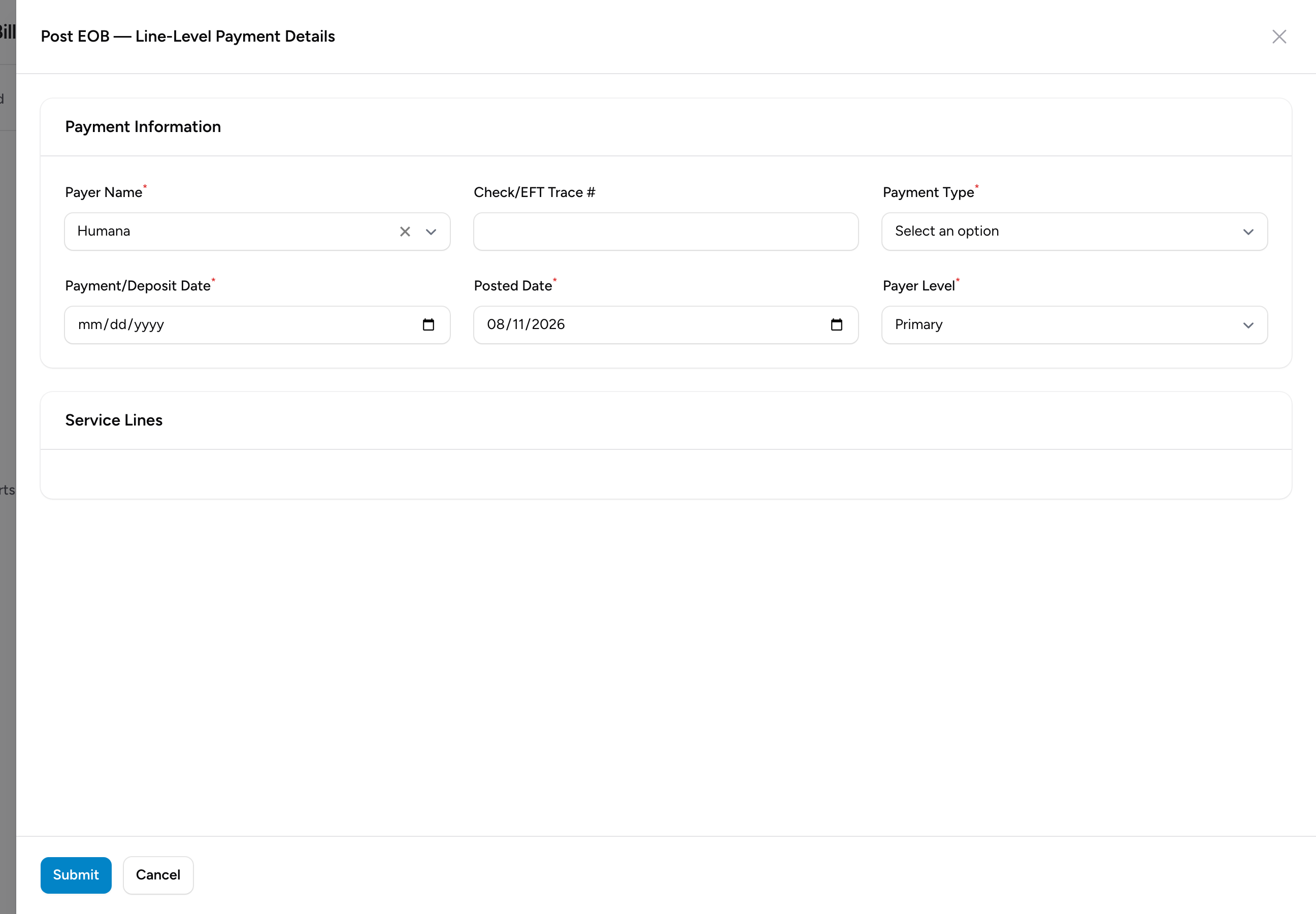
- In the Transactions section, click Post EOB. A wide panel slides open.
- Fill in the payment information: pick the Payer Name, enter the Check/EFT Trace # from the EOB, pick the Payment Type (Check, EFT, ACH, or CC Payment), and set the Payment/Deposit Date and Posted Date.
- Set the Payer Level: Primary, Secondary, or Tertiary, depending on which payer this EOB came from.
- The panel lists one row per service line on the claim, prefilled with the Code, Mod, and Billed amount. For each line, enter the Allowed and Paid amounts from the EOB.
- For each adjustment the payer took on a line, click Add Adjustment and enter the Group (CO for contractual obligation, PR for patient responsibility, OA for other adjustment, PI for payer initiated, or CR for correction and reversal), the Reason code, and the Amount. These codes are printed on the EOB next to each line.
- Click Submit.
What posting does
The system totals your lines and writes them to the claim's ledger: one payment entry for everything the payer paid, one contractual adjustment entry for the CO amounts, and one other-adjustment entry for the OA and PI amounts. The claim balance updates right away.
PR (patient responsibility) amounts are recorded on the EOB lines but are not posted as adjustments. They stay in the balance so you can bill them to the patient.
The per-line detail is saved with the claim. Ledger rows created this way get an EOB button that opens the line detail, and a secondary claim built from this claim carries the lines automatically.
Example
Medicare sends a paper EOB for a $1,200 transport with two lines. Line 1 (the base rate) shows $850 billed, $410.50 allowed, $328.40 paid, with a CO-45 adjustment of $439.50 and a PR-2 coinsurance of $82.10. You enter 410.50 in Allowed and 328.40 in Paid, then add two adjustments: CO with reason 45 for 439.50, and PR with reason 2 for 82.10. You do the same for the mileage line, then click Submit. The ledger shows the payment and the contractual adjustment, and the $82.10 coinsurance stays in the balance for the patient.
Tips
- Skip lines the payer did not pay or adjust. A line with no paid amount and no adjustments is ignored.
- If your remittances arrive electronically, you rarely need this form: those payments post through the remittance review queue or a remittance file import. Post EOB is for paper and PDF EOBs.