
What the dashboard is
The dashboard is your home screen in Unified Solutions. It is the first thing you see after you sign in (or after you pick an agency, if you belong to more than one). Everything you need is on this one page.
What is on the dashboard
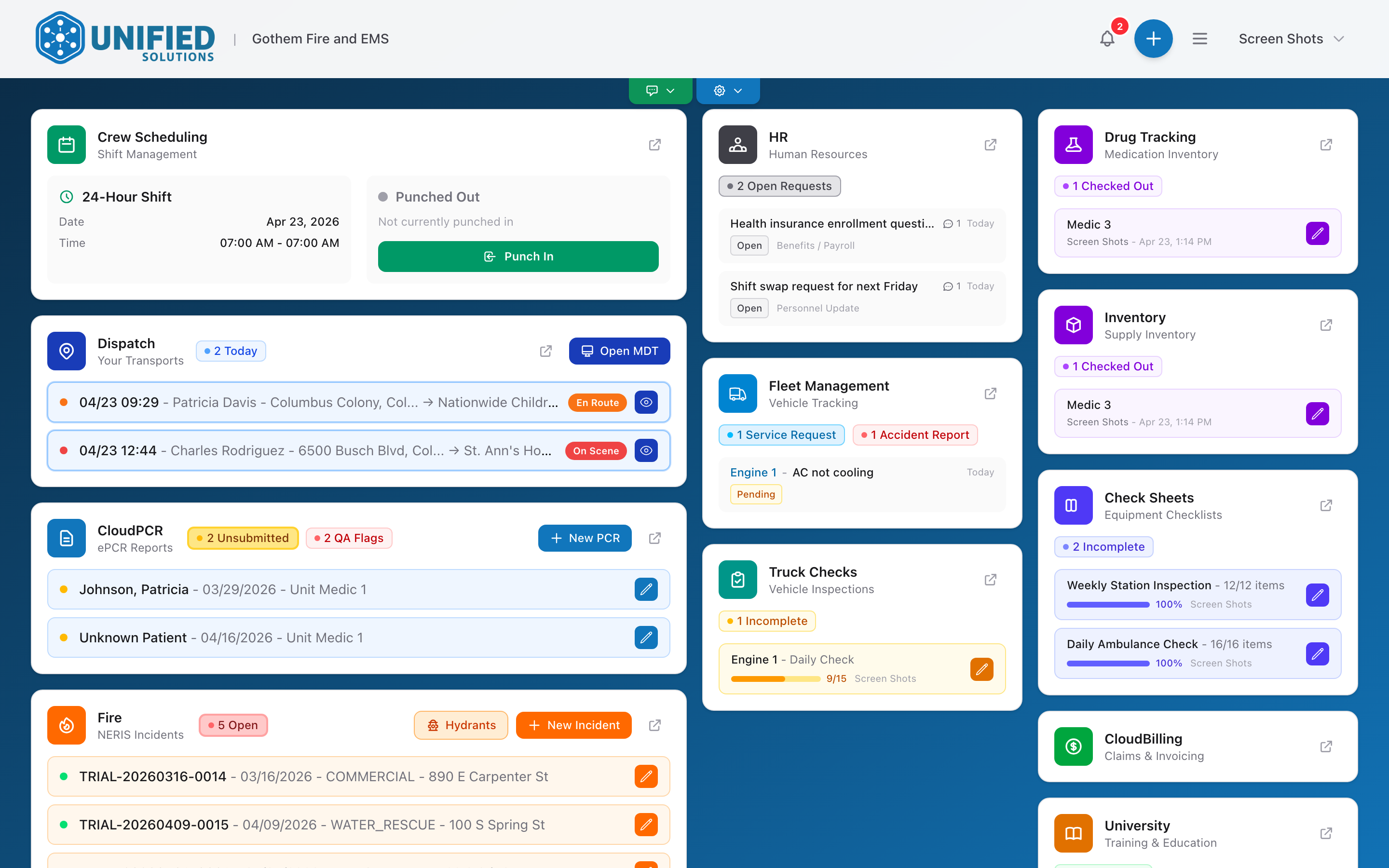
- Application tiles — one tile for each app your agency uses. Each tile shows a summary number and links you into that app with one click.
- Notification bell — the bell icon. Shows a badge with the number of unread notifications. Click it to see a list of recent alerts from all your apps.
- Quick actions — the + button. Opens a list of shortcuts for common tasks like filing an accident report or starting a truck check.
- Your name — in the menu. Click it to reach your account settings or sign out.
How to use the dashboard
Think of the dashboard as your morning briefing. When you sign in at the start of a shift:
- Glance at the tiles. Are there unsubmitted PCRs? Overdue truck checks? The numbers on the tiles tell you.
- Check the notification bell. Did a QA reviewer send something back to you? Is there a new message from your supervisor?
- Click through to the app you need to work in.
You can come back to the dashboard at any time by going to sso.unified-apps.com.