
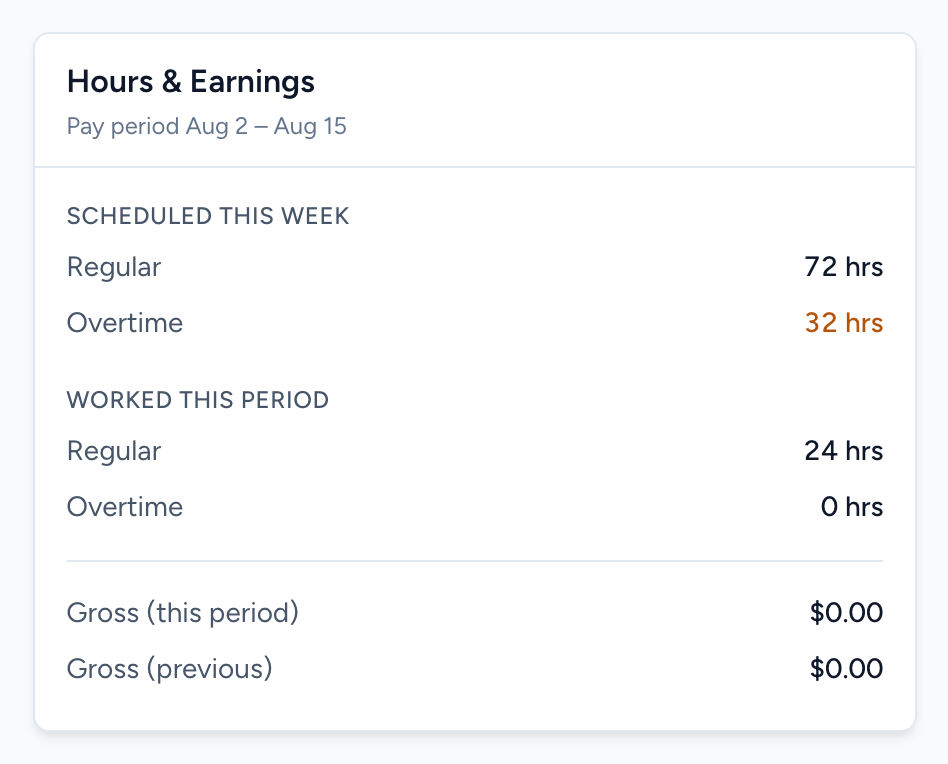
The Hours & Earnings card on the Dashboard is your quick answer to "how am I doing this period?" The subtitle shows which pay period it covers.
What each number means
- Scheduled this week — the Regular and Overtime hours on your schedule for the current week. Overtime shows in orange when it is above zero, so you can spot a heavy week before it happens.
- Worked this period — the Regular and Overtime hours you have actually punched during the current pay period.
- Gross (this period) — your earnings so far this pay period, based on the hours above and the pay rate your administrator set.
- Gross (previous) — the same number for the last pay period, for comparison.
If a number looks wrong
The most common reason is a punch problem — a missed punch-out inflates worked hours, a missed punch-in deflates them. Open Time Sheets under My Schedule to see each punch, and request a change on any that are wrong. If the hours are right but the dollars are not, your pay rate may need updating — that is set by your administrator.