
The on-scene safety check reminds your dispatchers to check on a crew that has been on scene longer than your agency expects. Once it is on, every dispatcher's screen shows an alert when a unit passes the time limit, and the answer is saved in the trip's notes.
Turning it on
The check is off until someone turns it on for your agency.
- Click your name to open the user menu, then click Settings.
- Under Connectors, click Dispatch Alerts.
- In the On-scene safety check card, turn on Alert when a unit stays on scene too long.
- In Minutes on scene before the alert, enter a number from 5 to 240. The default is 20.
- Leave Repeat every 20 minutes until the unit's status changes on if you want the alert to keep coming back while the unit stays on scene. The number in the label follows the minutes you entered.
- Under Which calls, pick Emergency calls only or Every call.
Each change saves as soon as you make it, so there is no Save button. The section header shows Saving… and then Saved.
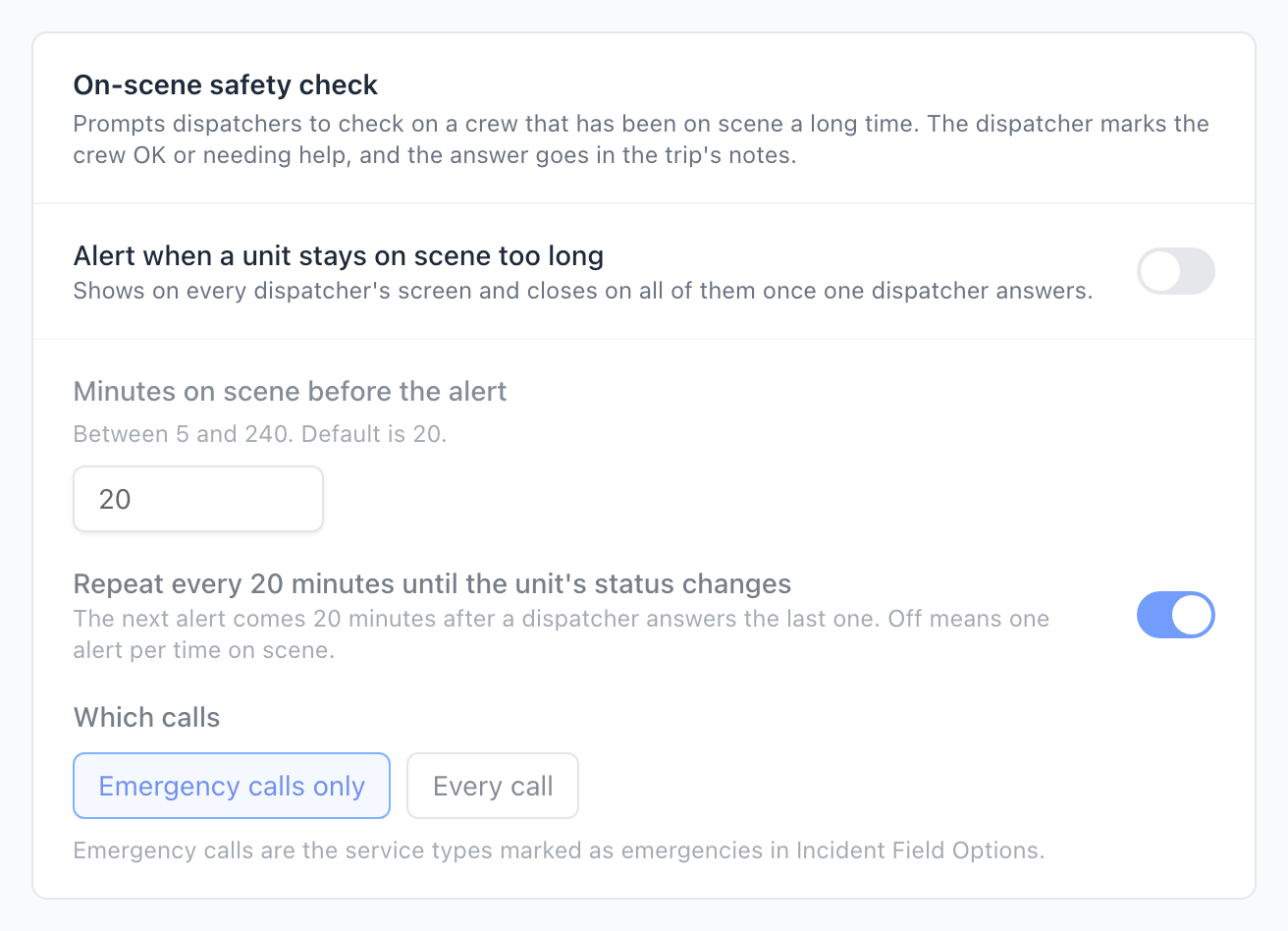
Emergency calls only means the service types your agency marks as emergencies, which you set with the lightning button in Customizing Incident Fields. A Wheelchair Transport trip never counts as an emergency.
When the alert shows up
CAD counts from the unit's on-scene time on the trip. When the unit has been on scene for your number of minutes, every dispatcher who has CAD open gets the alert, with a sound. A unit with no on-scene time gets no check. If someone corrects the on-scene time on the trip's Times tab, the count starts over from the new time.
When two units are on the same call, each one gets its own check.
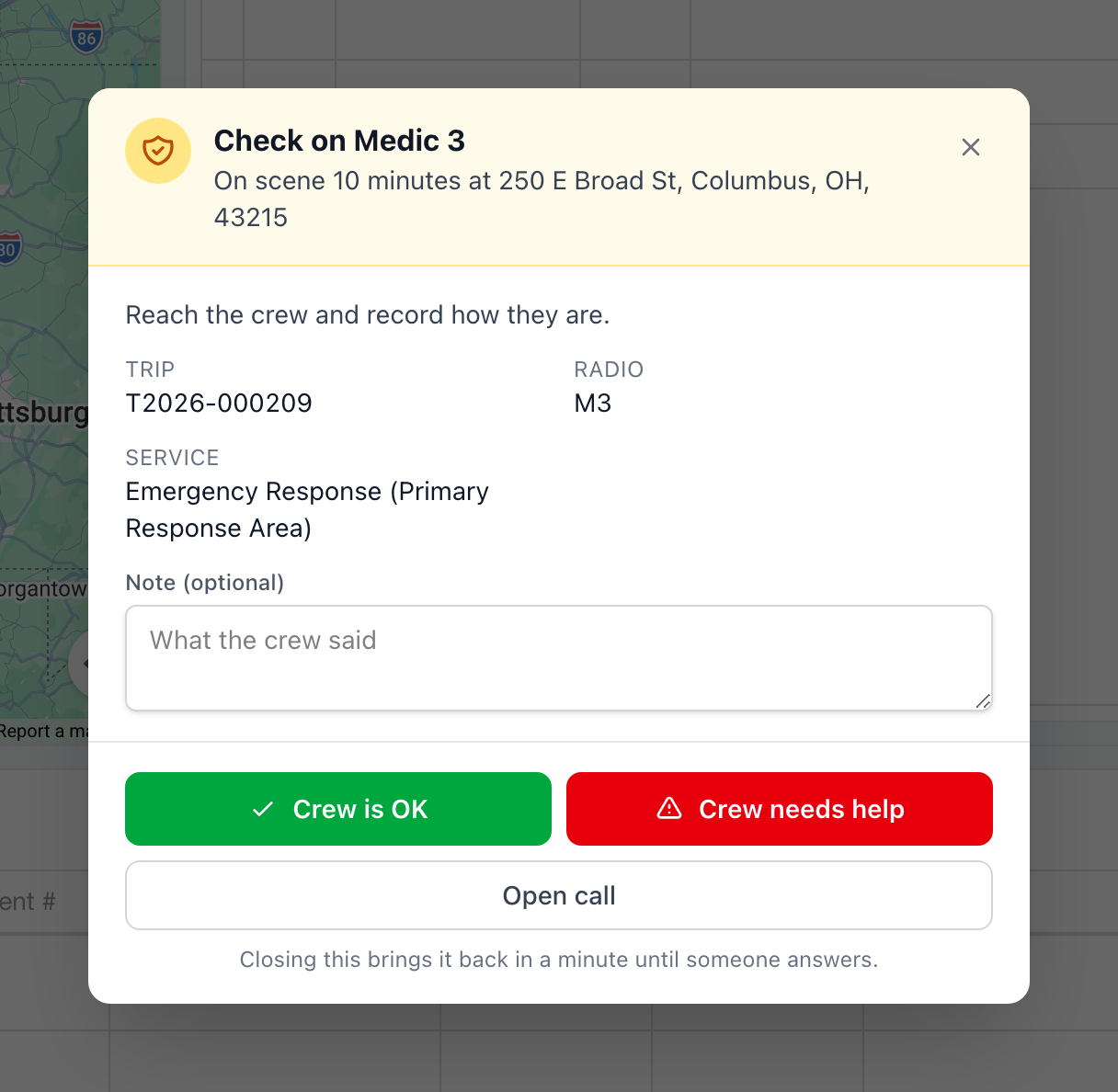
The alert is titled Check on and the unit's name, for example Check on Medic 3. Under the title it says how long the unit has been on scene and where. It also shows the Trip ID, the Radio designator when the unit has one, and the Service. The first check on a scene has an amber header. A repeat check has a red header and a Check line, such as 2 on this scene.
Answering the alert
- Reach the crew by radio or phone, the way you normally would.
- If you want to keep what they told you, type it in Note (optional). Notes can be up to 1,000 characters.
- Click Crew is OK or Crew needs help.
The first answer counts. The alert closes on every dispatcher's screen, and CAD adds a note to the trip, such as Safety check: crew OK (Medic 3, 23 min on scene) by Dana Price, with your note added to the end.
Crew needs help records the answer and marks the unit, but it does not send anyone or page anyone. Get the crew help the way your agency normally does.
Two other buttons do not answer the check:
- Open call opens the trip so you can read it. The alert comes back a minute later.
- The close button (or the Escape key) hides the alert on your screen only. It comes back in a minute until someone answers it.
What the units list shows
On the dashboard's active units table, the unit's Status cell carries a badge:
- An amber Check badge while a check is waiting for an answer.
- A red Help badge after someone clicked Crew needs help. It stays until the unit's status changes.
How repeat works
With repeat on, the next alert comes your number of minutes after a dispatcher answered the last one, not after the last alert appeared. Nothing new comes while a check is still waiting. With repeat off, each time on scene gets one alert.
When the checks stop
The checks end when the unit's status changes, for example to Transporting, or when the unit is taken off the call. If an alert is still open at that moment, it closes on every screen without an answer.
Example
Your agency sets 20 minutes, emergency calls only, with repeat on. Medic 4 goes on scene at a fall call at 2:05 PM. At about 2:25 every console gets Check on Medic 4. The dispatcher radios the crew, who say they are waiting for a lift assist. She types Waiting on lift assist and clicks Crew is OK. The trip gets the note, and the next check comes at about 2:45 with a red header. Medic 4 goes Transporting at 2:50, so no more checks come for that call.
Tips
- Pick a number that fits your calls. A short limit on every call type means alerts on routine pickups that just take time.
- The notes on the trip give you a record of every check, who answered it, and what the crew said.