
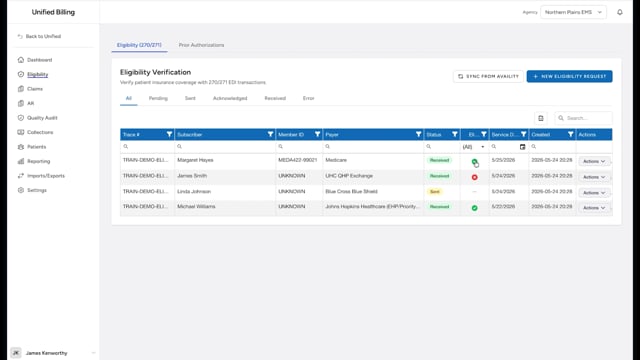
What eligibility verification is
Eligibility verification lets you check whether a patient has active insurance coverage before you submit a claim. Billing uses the standard EDI 270/271 format: a 270 request goes to the payer through your clearinghouse, and the 271 response comes back with the answer. The response tells you whether the patient is covered, what they may owe, and the coverage dates.
Checking eligibility before you bill saves time. If the patient's coverage has ended or the information is wrong, you find out now instead of waiting weeks for a denial.
Checking eligibility from a claim
- Open the claim you want to check.
- Scroll to the Payers section.
- Click the Check Eligibility button.
- Billing builds a 270 request from the patient and subscriber information on the claim. If your agency's clearinghouse connection is set up, Billing sends the request for you and the response comes back on the Eligibility page on its own. If your agency submits files by hand, Billing downloads the 270 file to your computer instead.
- If you received a downloaded file, send it to the clearinghouse you use for eligibility checks. When the 271 response comes back, upload it against the request on the Eligibility page (see uploading eligibility responses).
- Once the response is in, the text next to the Check Eligibility button shows Eligible or Not Eligible. Until then it shows Pending.
What the response tells you
Once the 271 response is in, Billing reads it and shows:
- Eligible or Not Eligible at the top, with the plan name and the coverage begin and end dates.
- Ambulance & Transport Coverage, the coverage lines that matter most for EMS billing.
- Plans Enrolled, every plan the payer reports for the patient.
- Patient Financial Responsibility, a table of copay, coinsurance, and deductible amounts when the payer provides them.
- Payer Reported Errors, any error the payer returned, such as a member ID that did not match.
Example
You have a claim for a patient with Blue Cross insurance. Before submitting, you click Check Eligibility in the Payers section. If your clearinghouse connection is set up, the response comes back on its own; otherwise Billing downloads the 270 file and you send it to your clearinghouse yourself. When the 271 comes back, the response shows the patient is Eligible with coverage starting January 1, and the Patient Financial Responsibility table lists a $250 deductible.
Tips
- Check eligibility before submitting any claim you are unsure about. It takes a minute and can save weeks of follow-up on a denial.
- If the response says the patient is not covered, check that the Policy ID and date of birth on the claim match the insurance card exactly.