
When you upload a response
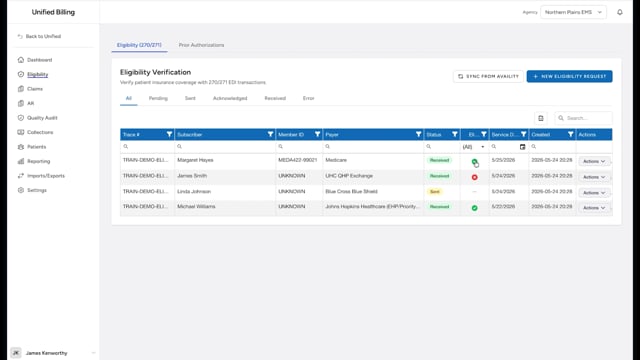
When you send a 270 eligibility request to your clearinghouse, it sends back a 271 response file. You upload that 271 against the request you created so the patient's coverage details are stored with the request.
If your agency's clearinghouse connection is set up, responses come back on their own and you do not need to upload anything; this page is for agencies that send their eligibility files by hand.
How to upload
- Click Eligibility in the menu.
- Find the request the 271 is for in the list.
- Click Actions on that row, then Upload 271.
- Choose the file in the 271 Response File field.
- Click Upload.
Viewing the results
After the upload finishes, the request row shows Received in the Status column and a green check or red X in the Eligible column. Click Actions and then View Response on the row to see the full details, including the plan name and coverage dates. Clicking the check or X in the Eligible column opens the same response view.
Tips
- Upload response files promptly so your eligibility records stay up to date.
- If a file fails to upload, check that it is a valid 271 EDI file from your clearinghouse.