
What integration settings are for
The Integrations tab is where Billing lists the addresses and credentials your ePCR system (or any NEMSIS-capable tool) uses to push run data into Billing. It is inbound only. Nothing here is used to send claims out; clearinghouse settings for claim transmission live elsewhere.
If your agency does not have an ePCR system pushing data automatically, you can skip this page. You can upload NEMSIS files yourself (see Importing from CloudPCR) or create claims by hand (see Creating a manual claim).
Where to find it
- Go to Settings → Agencies and click View on the agency.
- Click the Integrations tab.
Endpoints
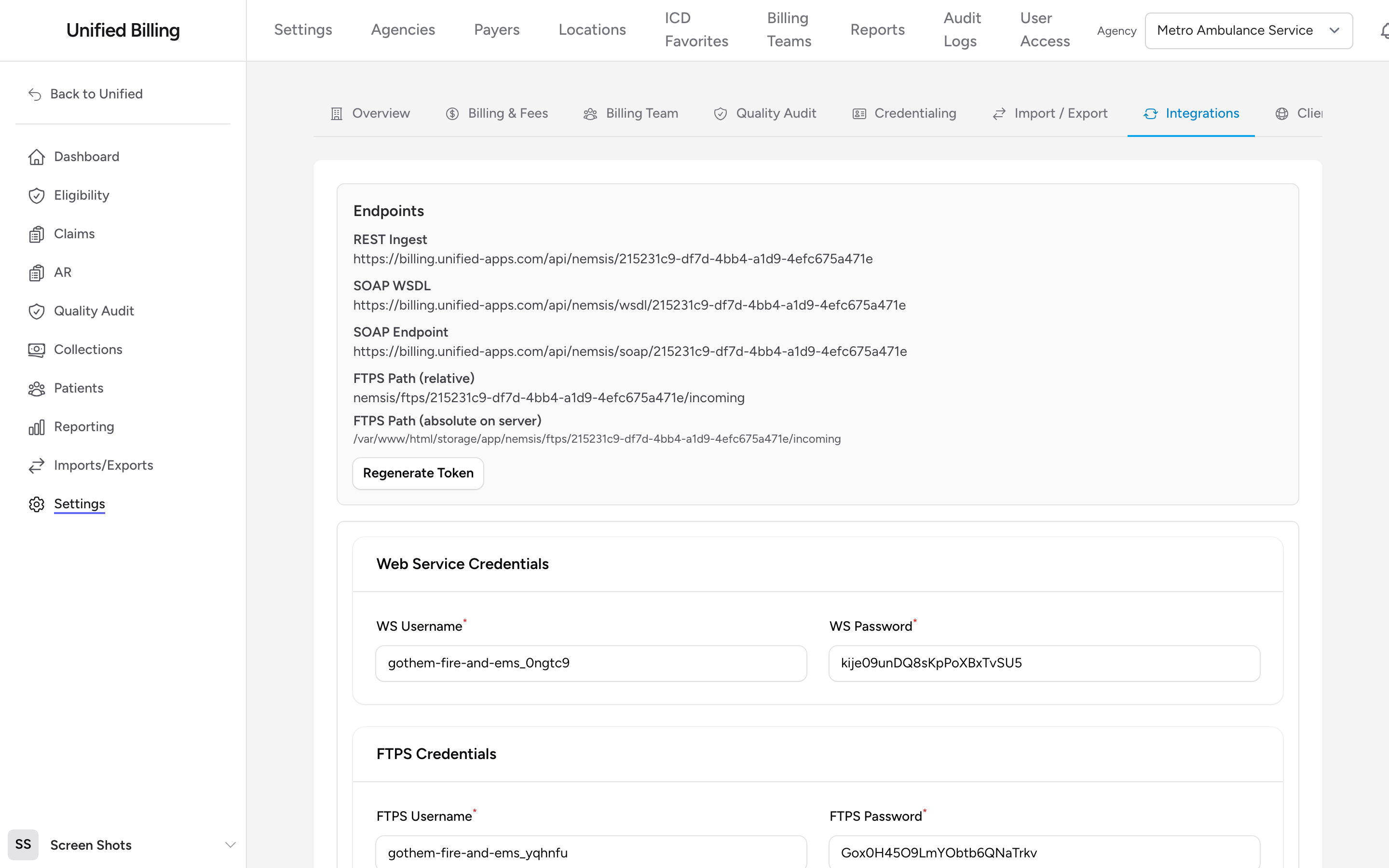
The Endpoints panel shows the addresses Billing generates for receiving NEMSIS data:
- REST Ingest - the address your ePCR posts NEMSIS XML to.
- SOAP WSDL and SOAP Endpoint - for tools that push data over NEMSIS web services.
- FTPS Path - the folder where your ePCR can drop NEMSIS files for pickup.
These addresses and the credentials below are shared by every agency in your billing account; incoming records are matched to the right agency automatically.
Click Regenerate Token to rotate the token built into these addresses. Every address changes at once, so update your ePCR configuration afterward.
Web service credentials
Under Web Service Credentials, set a WS Username and WS Password. Your ePCR uses these when it sends data through the SOAP address.
FTPS credentials
Under FTPS Credentials, set an FTPS Username and FTPS Password for the FTPS drop folder.
Click Save Credentials after changing any values. You can also click Regenerate WS Password or Regenerate FTPS Password to generate a new random password in place.
Example
Your ePCR vendor asks for a NEMSIS address and credentials. If they post over REST, copy the REST Ingest address; the token inside the address is the credential, so no username or password is needed. If they use NEMSIS web services, send the SOAP Endpoint plus the WS Username and WS Password (set or regenerate them, then click Save Credentials).
Tips
- Regenerating the token changes the addresses for every agency in your account at once. Every connected ePCR stops sending until you update its configuration with the new address.
- If submissions stop coming in after a credential change, the most common cause is trailing whitespace pasted into the username or password field.