
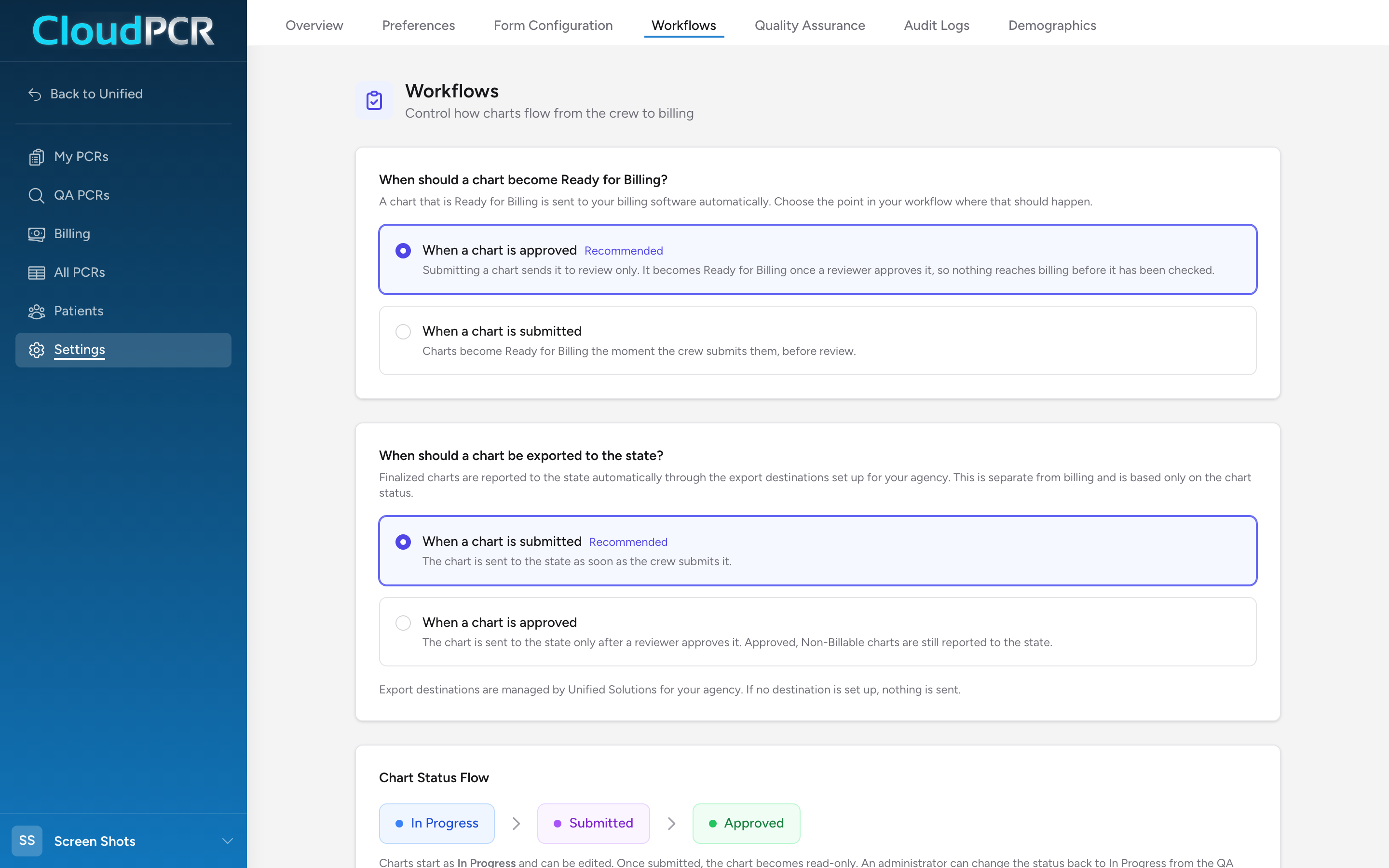
The Workflows page controls two decisions that shape how charts move through your agency: when a finished chart is handed to your billing software, and when it is reported to your state. It also shows a plain map of the chart statuses so everyone agrees on what Submitted and Approved mean.
Before you start: Settings is admin-only. If clicking Workflows shows an access message, your account does not have an admin role.
Open the page
- From the menu, click Settings.
- Click Workflows.
When should a chart become Ready for Billing?
A chart that is Ready for Billing is sent to your billing software automatically. This setting picks the moment that happens:
- When a chart is approved (marked Recommended, and the default) — submitting a chart sends it to review only. It becomes Ready for Billing once a reviewer approves it, so nothing reaches billing before it has been checked.
- When a chart is submitted — charts become Ready for Billing the moment the crew submits them, before review.
Most agencies should keep the recommended choice. It means a bad chart never lands in front of a biller — your reviewers catch it first. Pick the submit option only if your agency does not review charts before billing, or your billing team does its own review and wants charts as fast as possible.
When should a chart be exported to the state?
Finished charts are reported to your state automatically through the export destinations set up for your agency. This setting is separate from billing — it only watches the chart status:
- When a chart is submitted (marked Recommended, and the default) — the chart is sent to the state as soon as the crew submits it.
- When a chart is approved — the chart is sent to the state only after a reviewer approves it. Approved, Non-Billable charts are still reported to the state.
States generally want data quickly, which is why submit-time export is recommended. Switch to approval-time export if your reviewers routinely correct charts — you avoid sending a version you are about to change.
Tip: Export destinations themselves are managed by Unified Solutions for your agency. If no destination is set up, nothing is sent, no matter which option you pick here.
The chart status flow

The Chart Status Flow card on this page shows the path every chart takes: In Progress → Submitted → Approved. Charts start as In Progress and can be edited. Once submitted, the chart becomes read-only. An administrator can change the status back to In Progress from the QA page to allow further edits. See What the PCR statuses mean for the full status list.
The Approval Choices card explains the two ways a reviewer can finalize a chart:
- Approved — finalizes the chart and marks it Ready for Billing, so it is sent to your billing software.
- Approved, Non-Billable — finalizes the chart but marks it Non-Billable. The chart is never sent to billing. Use this for runs that should be closed out but not billed.
Reviewers choose either option from the status dropdown on the QA and All Charts pages.
What happens on submission
The What happens on submission card at the bottom of the page summarizes the submit moment, and it updates live as you change the billing setting above:
- Validation runs automatically to check for NEMSIS compliance.
- Chart status changes from In Progress to Submitted.
- Billing status is either set to Ready for Billing right away, or the chart waits for review — depending on your choice above.
- Once submitted, the chart becomes read-only unless changed back to In Progress.
A setup you can copy
This is the configuration most agencies run, and it is what a new agency starts with:
- Under When should a chart become Ready for Billing?, pick When a chart is approved.
- Under When should a chart be exported to the state?, pick When a chart is submitted.
Here is what a call looks like under this setup. A crew finishes a chart and submits it. The chart goes read-only, is reported to the state, and lands in the review queue — but billing has not seen it yet. A reviewer opens it, everything checks out, and they mark it Approved. Now it becomes Ready for Billing and is sent to your billing software. If the run turned out to be one you do not bill — a public assist, say — the reviewer picks Approved, Non-Billable instead, and the chart closes out without ever reaching billing.
How changes save
Clicking a choice saves it immediately — a green Saved note appears at the top of the page for a moment. There is no Save button.