
The Patient Info section is the identity of the patient — who they are, demographics, weight, and contact information. The rest of the Patient tab only becomes editable after you add a patient here.
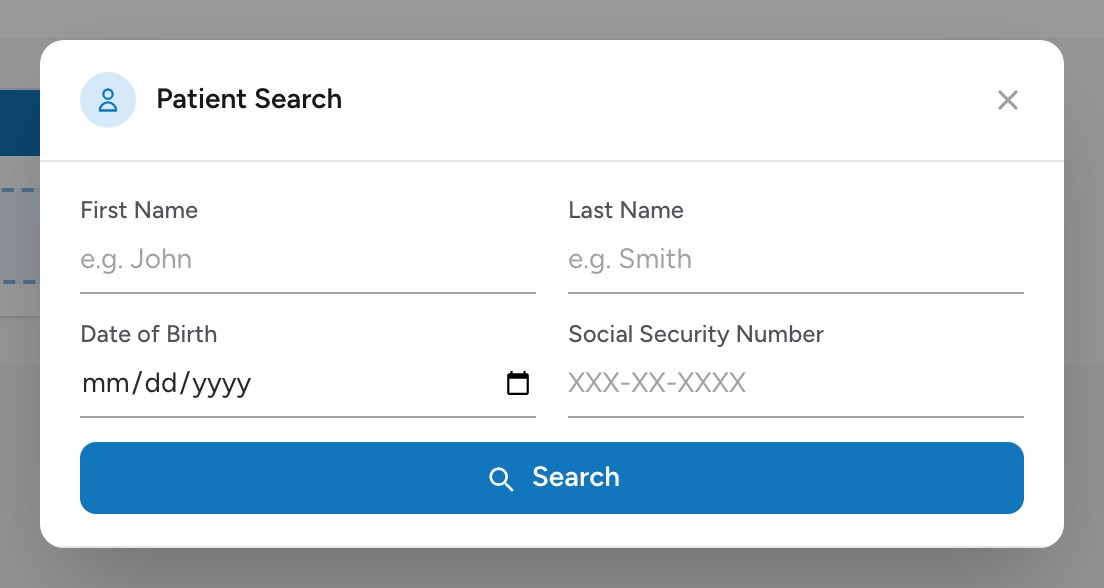
Adding a patient
- On the Patient tab, click Add Patient. The Patient Search window opens.
- Enter what you know in the search fields: First Name, Last Name, Date of Birth, and Social Security Number. Then click Search.
- If the patient is someone your agency has transported before, pick them from the results. Every field in Patient Info fills in from their record.
- If the search finds no match, click Add New Patient. CloudPCR creates a new record from the details you already typed. When matches were found but none is the right person, use Not one of these? Add New Patient below the results.
Once a patient is added, the rest of the Patient tab sections appear. If you picked the wrong record, you can change to a different patient from the section header.
Scanning a driver's license
The fastest way to fill in Patient Info is to scan the patient's driver's license. Click Scan License — it is in the Patient Info section header, and also next to Search inside the Patient Search window. It works on phones, tablets, and computers with a camera; your browser asks for camera permission the first time.
- Hold the wide barcode on the back of the license up to the camera. The scan reads it in a moment.
- Review what was read: name, date of birth, sex, address, and license number.
- If the chart already has a patient, click Apply to Chart and the fields fill in, with age calculated for you.
- If the chart has no patient yet, the button reads Find Patient instead. It searches your patient records using the license's name and date of birth: pick the match to link a returning patient, or click Add New Patient and the new record is created with everything from the license already saved.
Nothing is written to the chart until you apply, and Scan Again lets you retake a bad read. The license is read right on your device.
Name
Last Name, First Name, Middle Name, Suffix.
Demographics
- Social Security Number — masked. Use the PN button to record Refused, Not Applicable, or Unable to Complete instead of typing a fake value.
- Date of Birth.
- Sex.
- Time of Birth — shown only when the DOB is the same day as the incident (newborn).
- Gender — CloudPCR marks this field as deprecated; Sex is the current NEMSIS field.
- Age and Age Units — auto-calculate from DOB and incident date.
- Race — multi-select.
- Preferred Language(s) — multi-select.
Patient weight
- Estimated Body Weight — type a number and pick LB or KG. CloudPCR stores kilograms regardless of which unit you pick.
- Length Based Tape Measure — for pediatric calls, pick the Broselow color that matches.
Contact
Add one or more Phone Number(s) (each with a type you pick from the list) and one or more Email Address(es). Click Add phone number or Add email address to record additional ones.
Home address
Uses the same address lookup as the scene address. See Looking up an address. A Census Tract field is available here too. If the patient's home is the same as the scene, click Copy Scene Address to fill the home address in from the scene.
Alternate home residence
Alternate Home Residence — fill in if the patient lives somewhere other than a standard home (homeless, correctional facility, hospice, nursing home, etc.).
If the patient cannot tell you their information
For patients who are unconscious, intoxicated, or refusing to give info, use the NV button on each field — Not Applicable, Not Recorded, Not Reporting. NEMSIS allows these and CloudPCR will not block submission. Your state cares more about an honest "unknown" than a fake placeholder.
Important: If you link a patient you have transported before, always verify the information is still correct. People move, change phone numbers, and have birthday corrections. Look at the screen, look at the patient, and confirm.
NEMSIS required: Last Name, First Name, Date of Birth, Sex, Race, and the home address are NEMSIS-required for state submission. Use the NV button for anything genuinely unknown rather than making up a placeholder value.