
Use this article to record a set of vital signs on the Timeline tab of a PCR and to understand what each field is for. Vitals are entered as one or more sets, and each set carries its own time. Add a new vital set every time you take or reassess a patient's vitals.
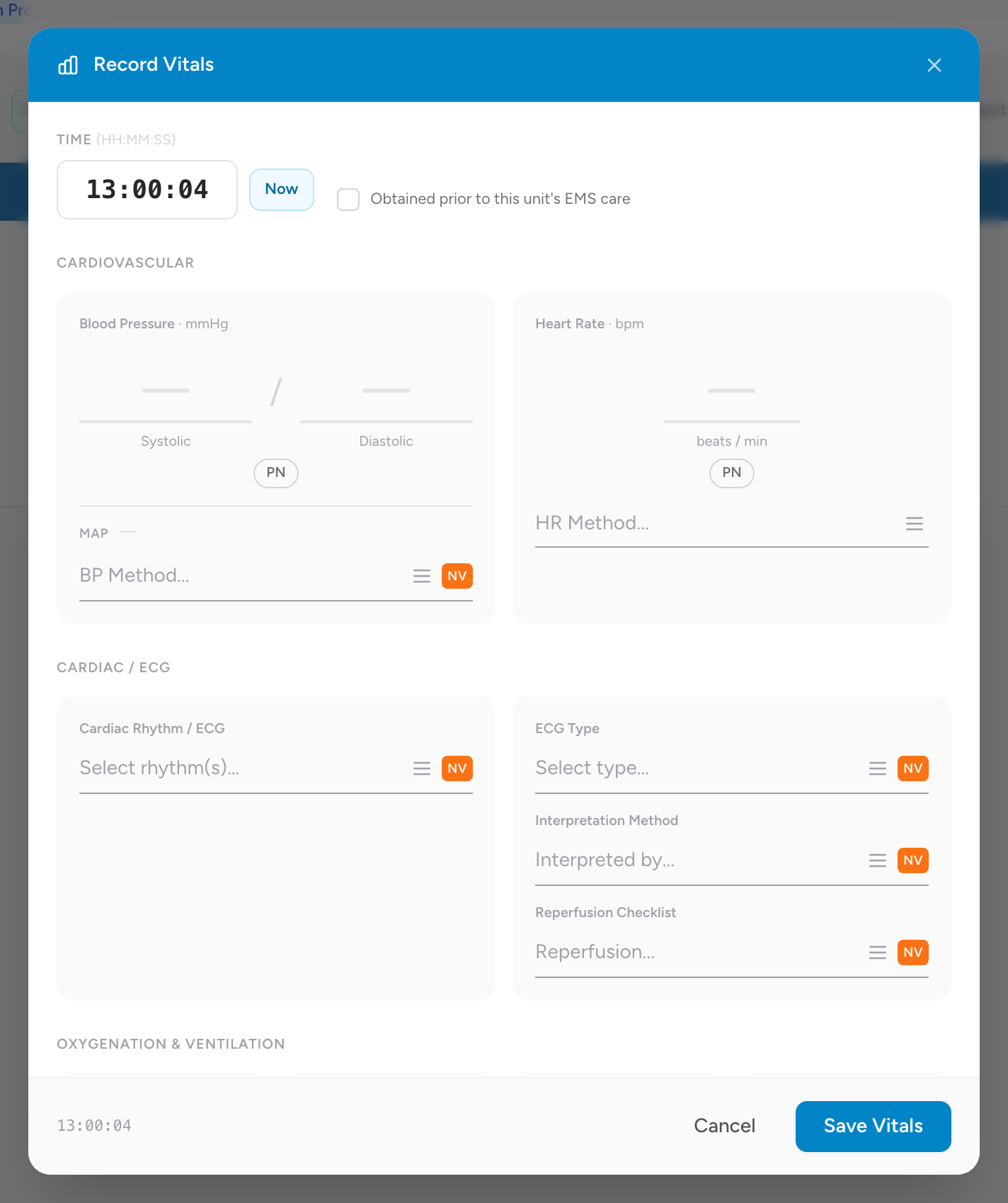
Before you start: You need an open PCR on the Timeline tab. If the patient has not been contacted yet, you can still add vitals; CloudPCR requires at least one vital set once patient contact has been made.
Two ways to add vitals: the Entry button and the Legacy buttons
The Timeline tab has a small New / Legacy toggle near the top right that changes how you add entries. Both save to the same place; pick whichever you prefer.
- New (the default) shows a single Entry button. Click it to open one entry window where you add vitals, medications, procedures, and more as stacked cards.
- Legacy shows one button per type, including + Vitals. Click + Vitals to open the Record Vitals window on its own.
Add a vital set
These steps use the default Entry button. If your Timeline is set to Legacy, click + Vitals instead of Entry at step 1 and skip straight to the vitals fields.
- On the Timeline tab, click Entry.
- Choose to add a vitals card. Enter the time, or click Now to stamp the current time. The date defaults to the incident date.
- Enter the readings you took. See the list below for what a set can hold. You do not have to fill in every field.
- If this set was taken before your unit took over care, mark it as obtained prior to arrival. CloudPCR often checks this for you automatically. See Marking vitals taken before you arrived.
- Click Save Vitals. If you are editing a set you already saved, the button reads Update Vitals.
What a vital set can hold
A vital set groups its fields into sections. You will not use every field on every call:
- Blood pressure — systolic, diastolic, and the method. Mean arterial pressure (MAP) fills in automatically from the systolic and diastolic, and you can type over it.
- Heart rate — the rate and the method.
- Cardiac rhythm and ECG — cardiac rhythm, ECG type, interpretation method, and a reperfusion checklist.
- Oxygen and ventilation — oxygen saturation (SpO₂) with a room-air or oxygen toggle, respiratory rate and effort, end-tidal CO₂ (EtCO₂), and carbon monoxide (CO).
- Other measurements — blood glucose (with quick High and Low buttons) and temperature (with an °F / °C toggle).
- Mental status — AVPU, and the Glasgow Coma Scale broken into eye, verbal, and motor. The GCS total adds up to a value out of 15 automatically.
- Pain scale — a 0 to 10 scale and the type of pain scale used.
- Stroke assessment (optional) — the stroke scale type, result, and score, with a Calculate helper for common scales.
- Trauma and pediatric scores — an APGAR score with a Calculate helper, and a Revised Trauma Score that calculates itself and cannot be typed in by hand.
Values CloudPCR works out for you
Some values are calculated from what you enter, so you do not fill them in yourself:
- GCS total — adds up eye, verbal, and motor.
- MAP — worked out from systolic and diastolic (you can override it).
- Shock index — shown when both heart rate and systolic blood pressure are present.
- Revised Trauma Score — worked out from GCS, systolic blood pressure, and respiratory rate.
Red and amber highlights on a reading
When a reading is outside the normal range for the patient's age, CloudPCR highlights that box in amber (a warning value) or red (a critical value). These highlights are there to catch your eye and double-check the number. They do not block you from saving and they are not validation errors.
How many sets do I need
Once you have made patient contact, CloudPCR requires at least one vital set; leaving vitals empty will produce the validation message "At least one vital is required. Please submit a vital record." Beyond that minimum, most transports have an initial set and a set right before you hand the patient over, and critical patients should have more frequent reassessment. Your state may set its own minimum.
Editing or removing a set
Each saved set shows on the Timeline with its own buttons. Click the pencil to edit it, the copy button to clone it as a starting point for the next set, or the X to delete it (CloudPCR asks you to confirm first).
Bringing vitals in from a cardiac monitor
You do not always have to type vitals in by hand. If your agency uses a Stryker or Zoll cardiac monitor, CloudPCR can import the readings straight onto the Timeline. See Importing cardiac monitor data.
A worked example
You respond to a syncope call. On scene you take a full set of vitals: blood pressure 90/60, heart rate 108, respiratory rate 18, SpO₂ 96% on room air, blood glucose 145, GCS 15, pain 0 out of 10, sinus tachycardia on the monitor. You click Entry, add a vitals card, click Now, enter the readings, and click Save Vitals. You start an IV and give 500 mL of saline. Ten minutes later you reassess: blood pressure 110/70, heart rate 92. You add a second set with just the values that changed. Right before you arrive at the hospital, you take a final set and add it.
Tip: You do not have to fill in every field on every set. Make the first set complete. Follow-up sets only need the values that changed and any values your state requires on every set.