
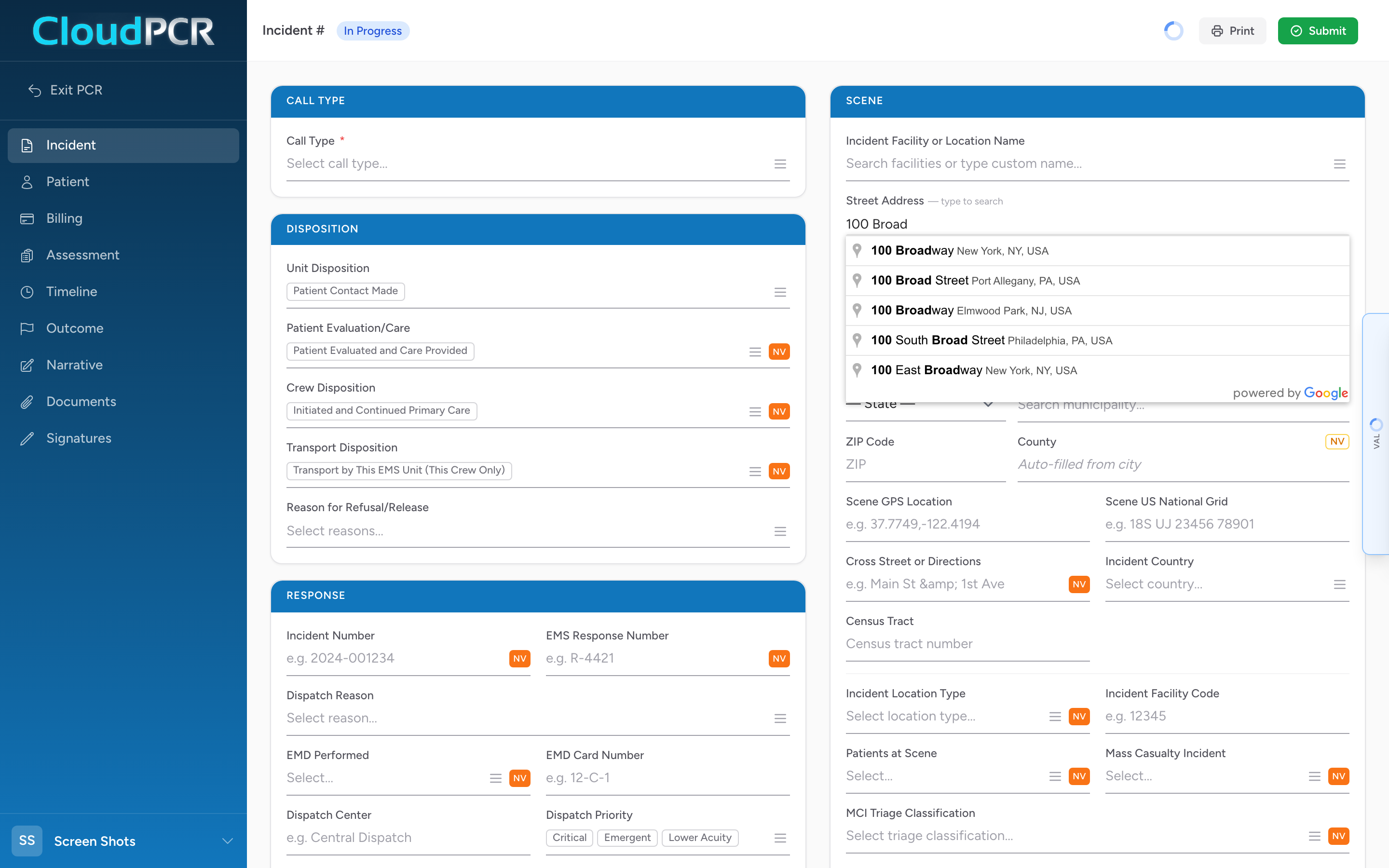
Anywhere in CloudPCR that you type an address — a scene address, a patient home, a facility — the street field is connected to Google search and the city field is connected to a national place list. The result is faster typing and cleaner data.
How it works
- Click in the street address field.
- Start typing the address — start with the street number and the first few letters of the street name.
- A list of matching addresses appears below the field.
- Pick the right one.
- The street, city, state, and ZIP fill in for you.
- The county fills in based on the city.
Why CloudPCR locks the city to a list
NEMSIS requires the city to come from an official place list, not free-form text. If you type the city by hand, CloudPCR will not let you save until you pick a real city from the dropdown. This means your state always gets clean, validated data, and your billing team never has to deal with "Springfeild" or "Cinncinati."
If a place is not in the list
The list is the USGS GNIS list of civil divisions, populated places, census-designated places, and military installations. Unincorporated areas may not have their own entry. If you cannot find what you need, pick the nearest named town or township — those are in the list under their official name.
An example
You respond to a call at "1234 Maple Street." You type "1234 Maple" in the street field. Google offers three options. The first is "1234 Maple Street, Springfield, OH" — the right one. You pick it. The street, city, state, ZIP, and county all fill in. Total time: about 4 seconds. No typos.