
The Destination / Transfer section on the Outcome tab is where you record the facility you took the patient to, how to identify it, and why you picked it.
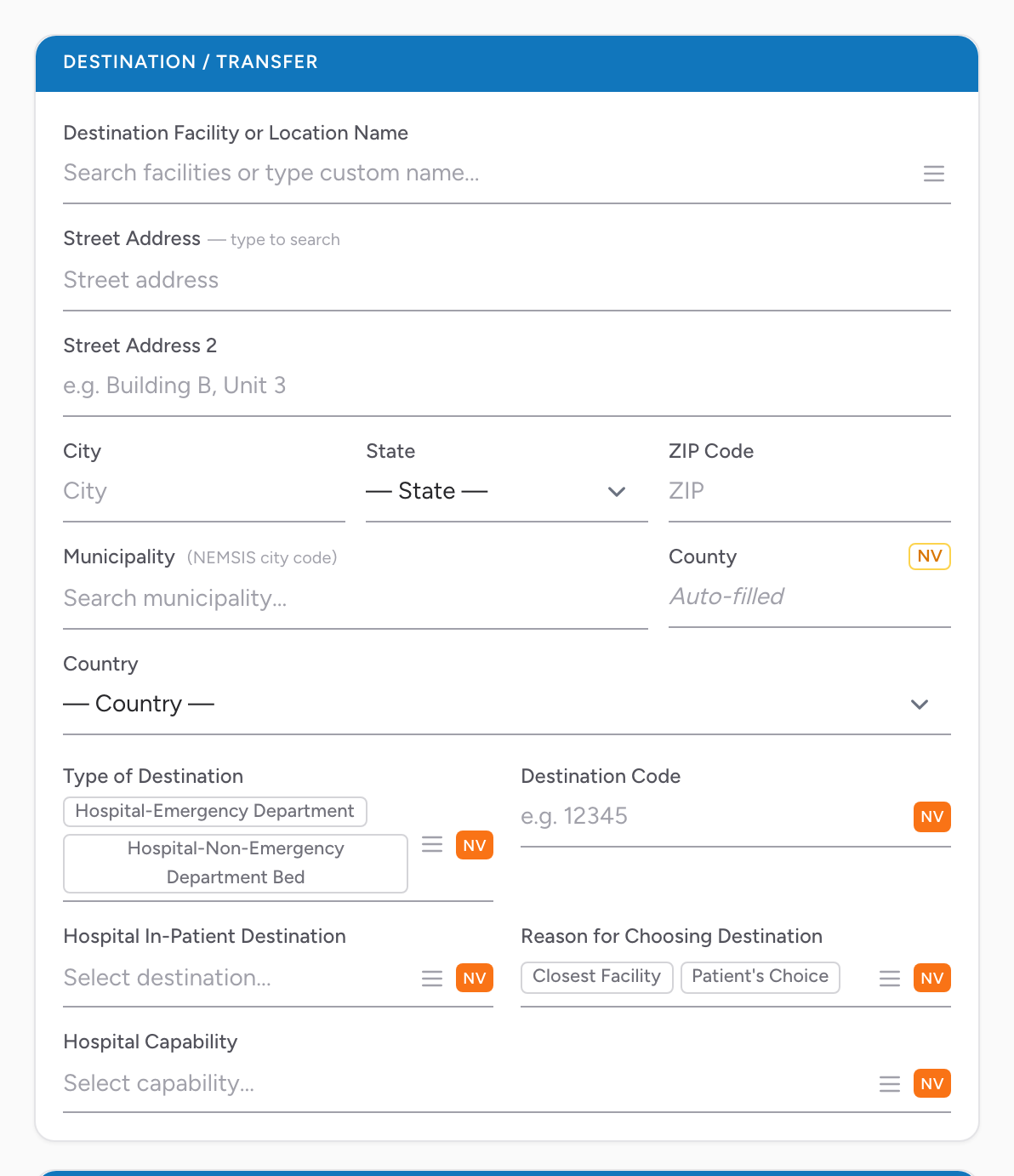
Facility and address
- Destination Facility or Location Name — pick from your agency's facility list. Picking a stored facility auto-fills the address, destination code, and hospital capabilities. When two facilities on your list have the same name, each shows its street, city and code under the name so you can pick the right one. If the place isn't on your list, click Search all (your state) facilities under the field to pick it from your state's full list for this chart. See Searching all state facilities.
- Street Address, Street Address 2, City, State, ZIP Code, County, Country — the facility's address. See Looking up an address.
What your state takes for each facility
States only accept destination codes from their own facility list. Each facility in the picker carries a badge that says how it goes to your state:
- Accepted: the facility is on your state's list. The Destination Code is your state's code for it, even when the facility was added from a neighboring state's list.
- Sent as (a name), for example Sent as Unlisted Hospital: your state doesn't list this facility, so the chart sends your state's code for unlisted places. The facility's real name and address stay on the chart.
- Not accepted by (your state): your state has no code for this facility. Where the state turns these charts down, picking it opens This destination can't go on the chart with the reason. Click Use followed by the facility name it suggests to put that on the chart instead, or Cancel to pick another destination. Where we haven't yet confirmed how the state handles it, the facility goes on the chart and a warning shows under the field.
The same check runs when you pick from Search all (your state) facilities, and in the Unified Mobile app. Billing always gets the facility's real name. Your administrator can see each facility's answer in the State report column of Facilities.
Destination classification
- Type of Destination — a single-select list of the NEMSIS destination types (Home, Hospital-Emergency Department, Hospital-Non-Emergency Department Bed, Clinic, Urgent Care, Dialysis Center, Nursing Home, Mental Health Facility, Morgue/Mortuary, and others).
- Destination Code: the code your state uses for the facility. Picking a stored facility fills it with the code your state takes (see above).
- Hospital In-Patient Destination — when the destination is a hospital, the in-patient unit (for example Cath Lab, ICU, OR, Burn, L&D).
- Reason for Choosing Destination — multi-select list of the NEMSIS reasons for choosing a destination.
- Hospital Capability — multi-select. Auto-populated from the facility record if the facility has designations set.
Why "reason" matters
If you bypassed the closest hospital to take a STEMI to a cath-capable center, Reason for Choosing Destination is what shows you made the right call. Without it, the bypass looks like a longer transport time on a report. With it, the report explains why — and your medical director, your state, and your agency's leadership all see the clinical justification.
An example
You have a patient with a confirmed STEMI on 12-lead. The closest hospital is a community ED 4 miles away, no cath lab. The regional STEMI center is 18 miles away. You bypass the community ED and transport to the STEMI center.
In the Destination section you pick Regional STEMI Center in the Destination Facility field — the address and hospital capabilities fill in from the stored facility. Type of Destination Hospital-Emergency Department. Hospital In-Patient Destination Hospital-Cath Lab. Reason for Choosing Destination — check Regional Specialty Center and Protocol. Hospital Capability already shows the cardiac designation from the facility record. The longer transport time is fully justified.
Tip: Keep your facilities list up to date in Unified Settings (see Facilities). If every facility has the right hospital designations on record, this section fills itself in.
NEMSIS required: Destination address, Type of Destination, and Reason for Choosing Destination are NEMSIS-required for state submission. The county field stores the 5-digit FIPS code — if you are on a scene where the FIPS code is unknown, use the NV button.