
The Cardiac Arrest section only matters if the patient was in cardiac arrest at some point during the call. When it applies, the data here is some of the most-analyzed in EMS — your medical director, your state, and national registries like CARES all review it.
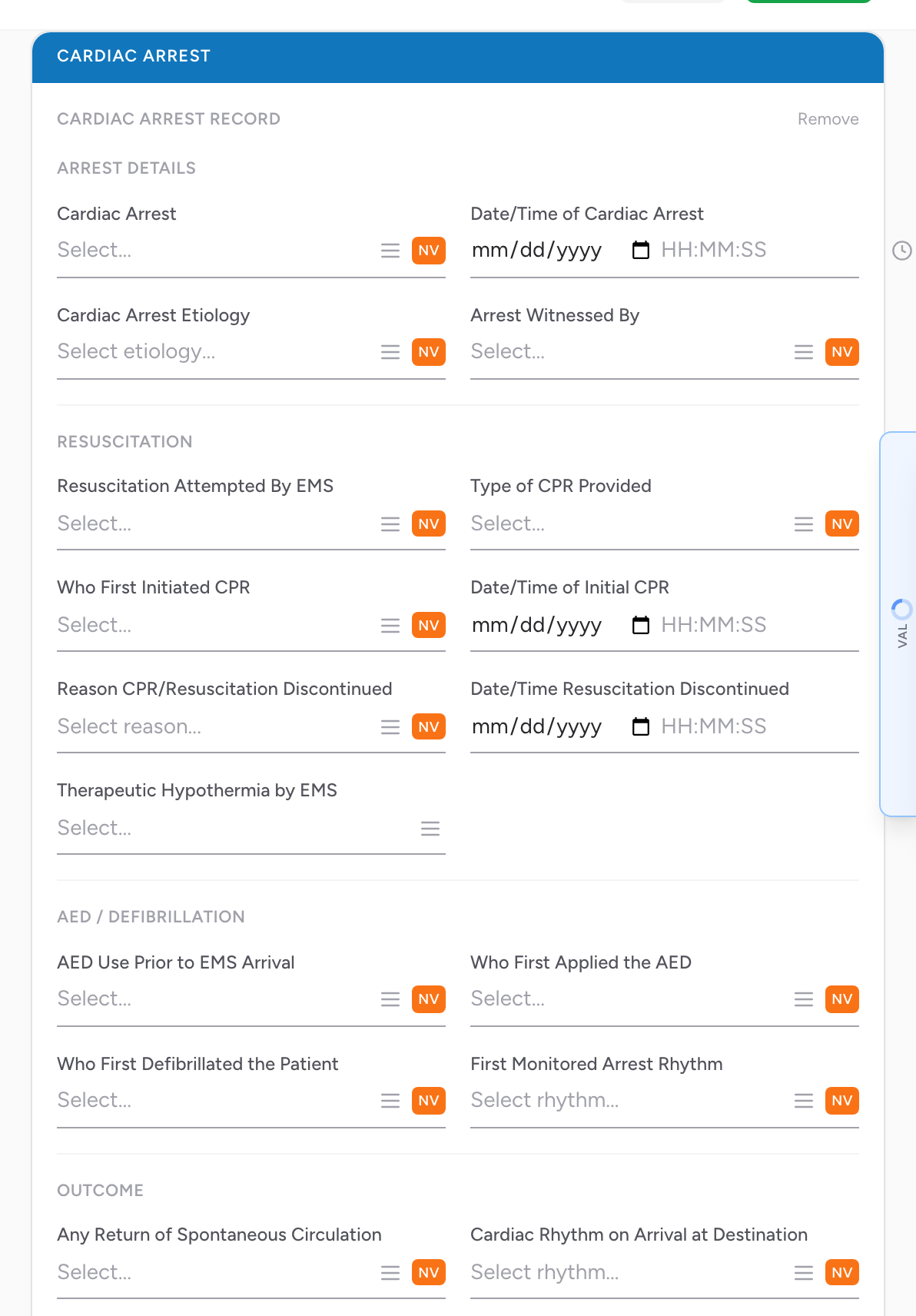
Opening the section
On the Assessment tab, the Cardiac Arrest section starts collapsed with a single Add Arrest button. Click it to open the section — all the fields below become visible. If the call is not a cardiac arrest, leave it collapsed.
If you open it by mistake, click Remove at the top of the section to collapse it again.
Arrest Details
- Cardiac Arrest — whether the patient was in arrest. Pick from the list.
- Date/Time of Cardiac Arrest — when the arrest happened. If you do not know the exact time, this field has both an NV button and a PN button (with Unable to Complete and Approximate).
- Cardiac Arrest Etiology — the presumed cause. Pick from the list.
- Arrest Witnessed By — multi-select. Pick every category that applies.
Resuscitation
- Resuscitation Attempted By EMS — multi-select. Pick everything you did.
- Type of CPR Provided — multi-select. Pick from the list.
- Who First Initiated CPR — who started CPR. Pick from the list.
- Date/Time of Initial CPR — when CPR started.
- Reason CPR/Resuscitation Discontinued — why CPR was stopped. Pick from the list.
- Date/Time Resuscitation Discontinued — when it stopped.
- Therapeutic Hypothermia by EMS — whether you cooled the patient. Pick from the list.
AED / Defibrillation
- AED Use Prior to EMS Arrival — whether an AED was used before you arrived. Pick from the list.
- Who First Applied the AED — pick from the list.
- Who First Defibrillated the Patient — pick from the list.
- First Monitored Arrest Rhythm — the rhythm you saw when you first got the monitor on. Pick from the list.
Outcome
- Any Return of Spontaneous Circulation — multi-select. Pick every point at which you got a pulse back.
- Cardiac Rhythm on Arrival at Destination — multi-select. Pick from the list.
- End of EMS Cardiac Arrest Event — how the call ended for your unit. Pick from the list.
- Neurological Outcome at Hospital Discharge — fill in if your agency follows up and you know the outcome. Most crews leave this blank; your medical director or QA team fills it in after the fact.
An example
You respond to an unresponsive patient. The husband was doing CPR when you walked in — he saw her collapse 4 minutes ago. You put her on the monitor and find ventricular fibrillation. You shock once, continue CPR, and after 6 minutes of work you get a pulse back. You transport her with a sustained pulse to a STEMI center.
Click Add Arrest. Under Arrest Details, record that the patient was in arrest, enter the arrest time, and pick the etiology and who witnessed it. Under Resuscitation, pick what you attempted, the type of CPR, and who first started CPR. Under AED / Defibrillation, record that no AED was used before you arrived and pick the first monitored rhythm. Under Outcome, record that you got a pulse back in the field and that the call ended with a sustained pulse to the hospital.
Tip: These fields feed CARES, ROC, and your state's cardiac arrest registry. Get them right the first time — registry data is almost never corrected after the fact.