
The Delays section is where you record anything that slowed your call down. Delay reporting feeds into operational reviews and protects your agency when response times look long.
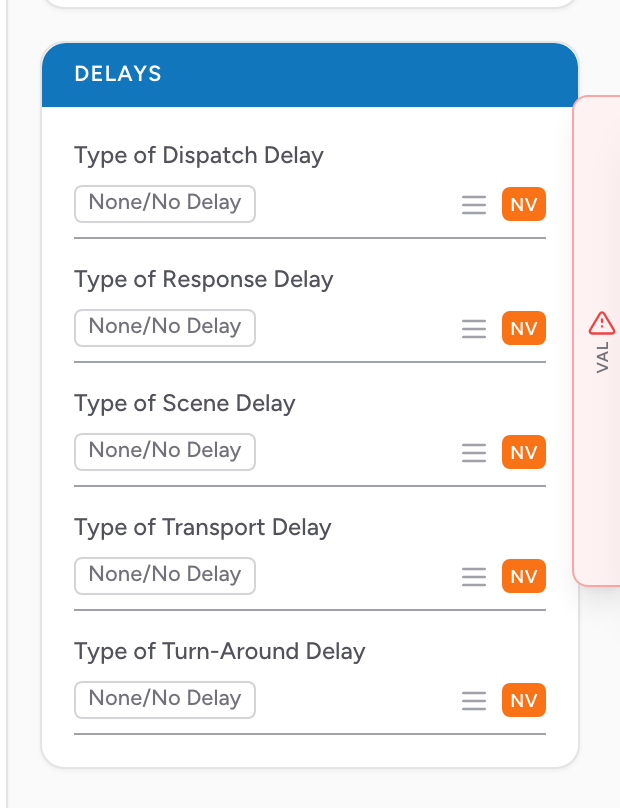
No delays? One click
Most calls have no delays at all. Click None in the Delays section header and all five fields fill in with None/No Delay at once. And if you leave the delay fields blank entirely, the finished report records them as no delay automatically — so a clean call never needs you to touch this section.
The fields
Each delay type is its own multi-select dropdown. Open the one that matches the stage of the call where the delay happened and pick every reason that applies — you can pick more than one.
- Type of Dispatch Delay — delays getting the call out of dispatch.
- Type of Response Delay — delays on the way to the scene (traffic, weather, distance, directions, etc.).
- Type of Scene Delay — delays once on scene (patient access, scene safety, extrication, staging, etc.).
- Type of Transport Delay — delays during transport to the destination.
- Type of Turn-Around Delay — delays at the destination that kept you out of service.
An example
You respond to a fall in a rural area, 18 miles from your station. The patient is stable but the response time looks long because of the distance. Open Type of Response Delay and pick the reason that applies (such as distance). When the monthly response time report comes out, this PCR is flagged as having a documented delay reason instead of being counted as a slow response.
Tip: Document delays even when the call goes well. The data is useful for staffing, posting, and showing your community why a 12-minute response time happened.