
Opening the patients list
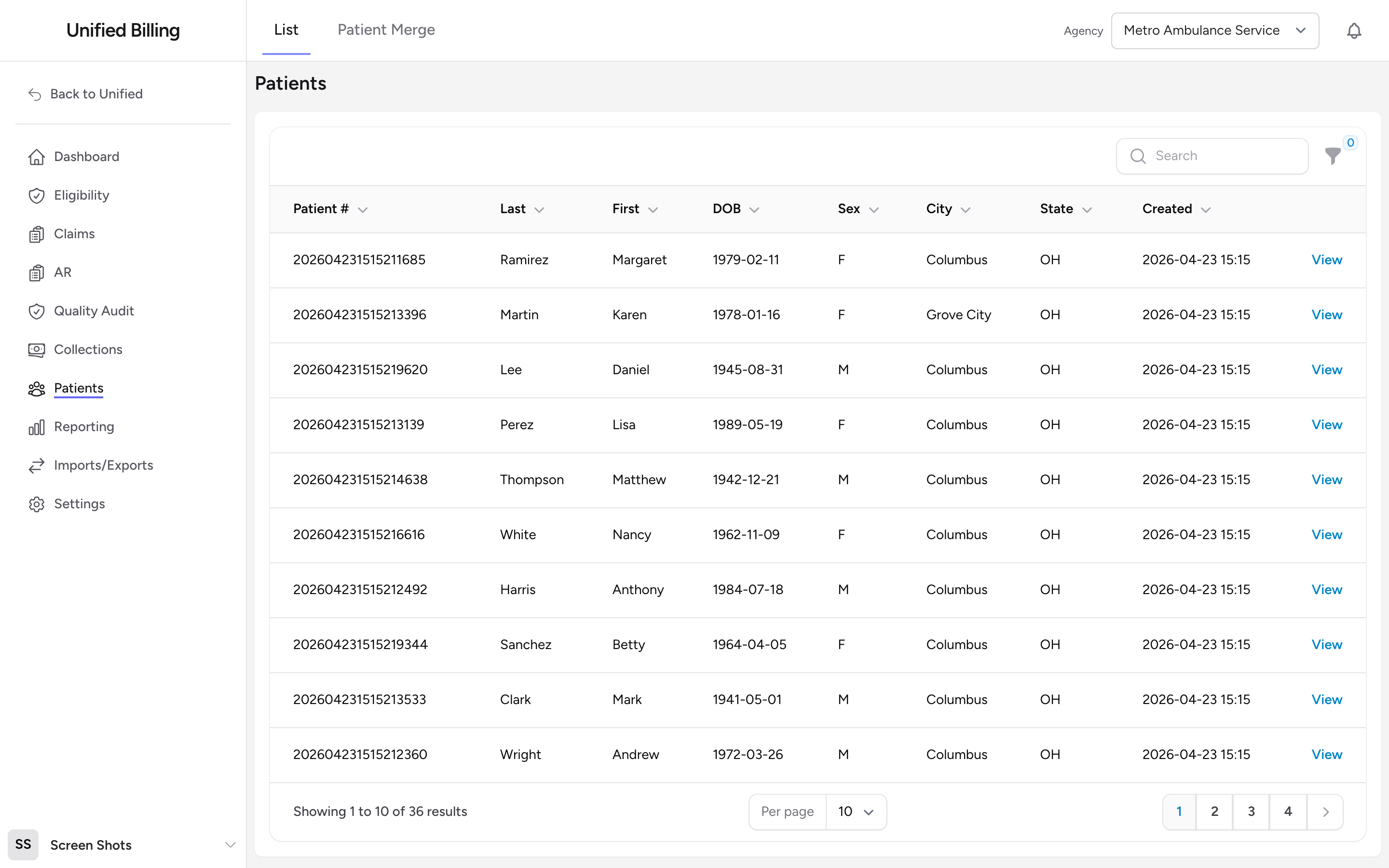
Click Patients in the menu. You see a searchable list of patients for the agency picked in the agency selector at the top of the page. A patient appears here once they have at least one claim, no matter how that claim arrived. If the list is empty, check that an agency is selected. Records that have already been merged into another patient are hidden here; only the primary records show up.
Searching for a patient
Use the search box above the table to find a patient by Patient #, last name, first name, or city. The list filters as you type.
Columns
Each row shows Insurance, Patient #, Last, First, DOB, Sex, City, State, and Created. The Insurance column shows an amber Review badge when the patient has sent updated insurance that needs your review; open the patient to handle it (see Reviewing insurance updates patients send you). The Patients item in the menu carries a matching count badge, so you can see from anywhere how many reviews are waiting. Use the DOB range filter to narrow the list by date of birth.
Opening a patient
Click View on the row to open the patient's detail page.
Example
A patient calls and asks about a bill. You go to the Patients list, type their last name in the search box, and their record appears. Click View to open the detail page and see every claim linked to their account.
Tips
- If a search returns no results, try the Patient # or a different spelling of the name.
- Use the DOB filter when several patients share the same last name.