

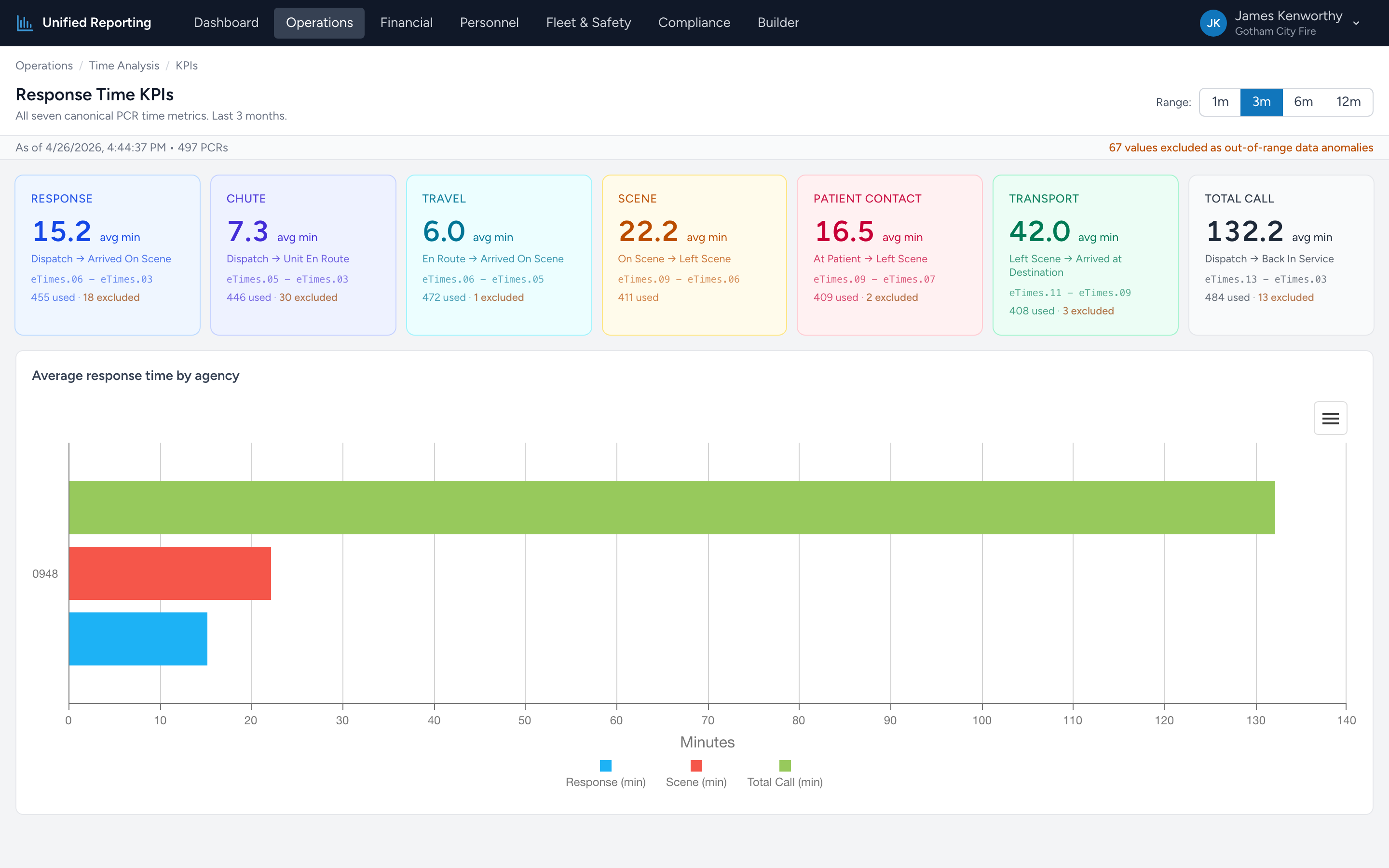
Response Time KPIs is the headline number page. Seven big tiles, one per timing interval, each showing the average over your selected window plus how many PCRs went into the average.
How to use it
- Open Operations → Time Analysis → Response Time KPIs.
- Pick a range — 1, 3, 6, or 12 months.
- Each tile updates with the average in minutes (one decimal), along with the count of PCRs that contributed.
The seven KPI tiles
- Response — dispatch notification to on-scene. The headline number for "how fast are we getting there?"
- Chute — dispatch notification to en-route. How long crews take to roll once toned.
- Travel — en-route to on-scene. Drive time only.
- Scene — on-scene to leaving the scene. Time spent assessing and stabilizing.
- Patient Contact — patient first reached to patient at destination. Total under-care time.
- Transport — leave scene to arrive at destination. Drive time with patient.
- Total Call — dispatch to back-in-service. Whole-incident duration.
"n=1,516 · 21 excluded"
The smaller text under each KPI shows how many PCRs were averaged and how many were thrown out for being out of range. Excluded usually means a wrong-day timestamp (Response showing 8 hours, that kind of thing). Excluded counts let you see, at a glance, whether your data is healthy.