
The Transport Information section is where you record the details of how you got the patient to the destination. It sits on the Outcome tab, just below Destination / Transfer.
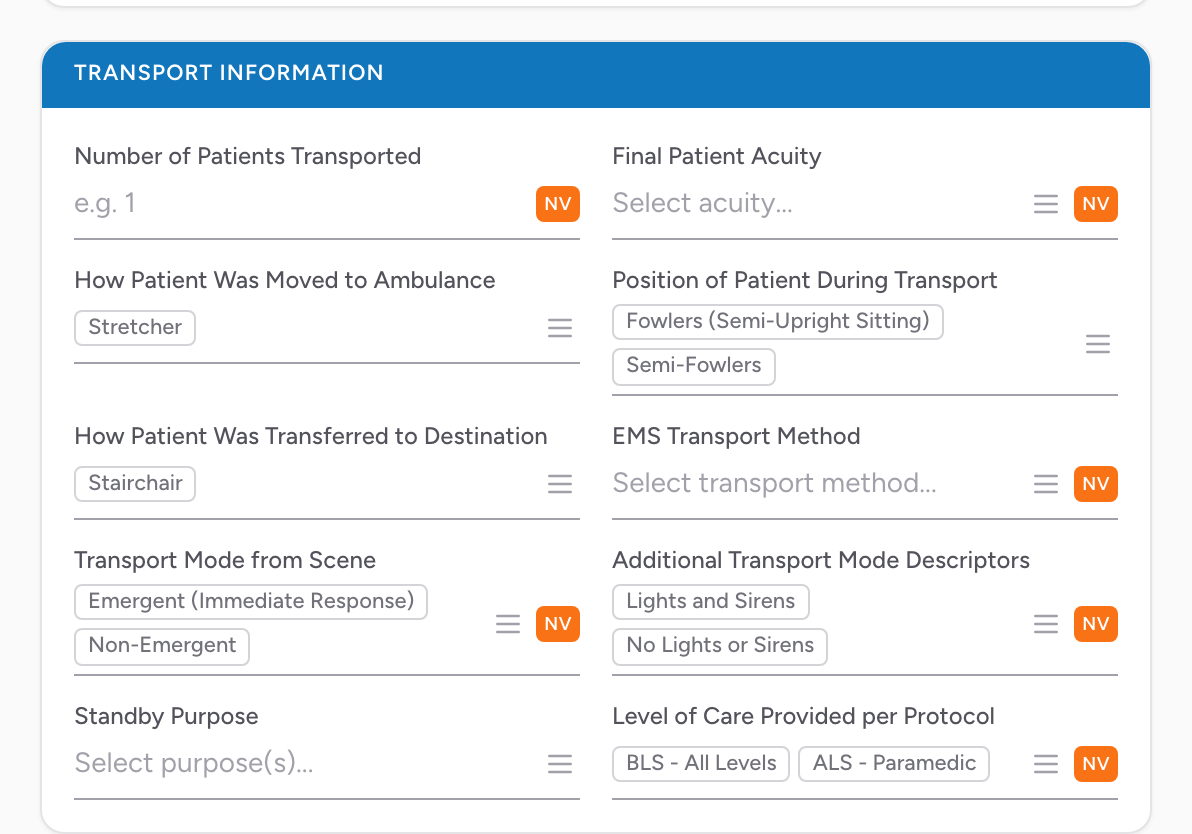
The fields
- Number of Patients Transported — numeric.
- Final Patient Acuity.
- How Patient Was Moved to Ambulance — multi-select.
- Position of Patient During Transport — multi-select.
- How Patient Was Transferred to Destination — multi-select.
- EMS Transport Method.
- Transport Mode from Scene.
- Additional Transport Mode Descriptors — multi-select.
- Disposition Instructions Provided — multi-select. Pick any instructions you gave the patient.
- Level of Care Provided per Protocol.
Call-level disposition (refused, no patient found, treat and release, deceased, etc.) lives on the Incident tab — see Disposition section.
An example
You transport one chest pain patient from the scene to the STEMI center. Fill in Number of Patients Transported = 1, pick the matching Final Patient Acuity, pick how the patient was moved to the ambulance and their position during transport, how they were transferred at the hospital, the EMS transport method, and the transport mode from scene. Anything not applicable on this call can be left unset or marked NV.