
On the Unified Solutions dashboard, the CloudPCR tile is your shortcut into the app. It also shows you a quick view of what is waiting for your attention.
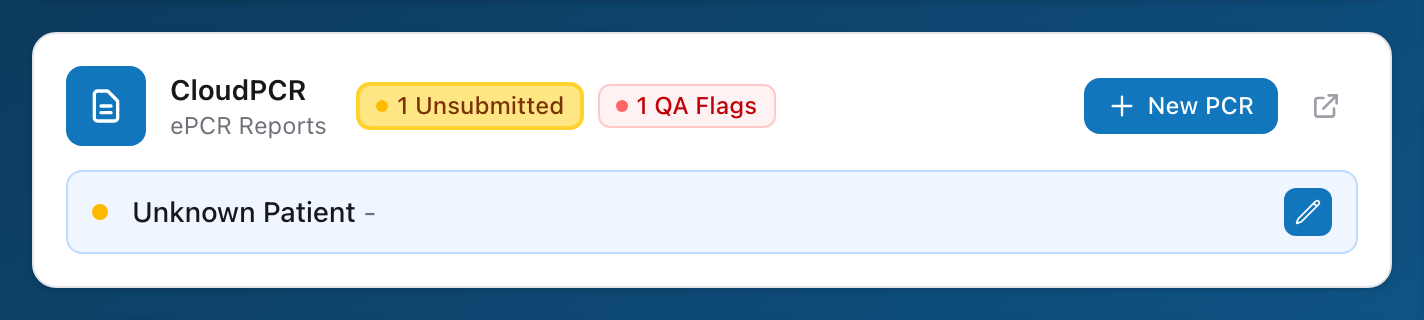
What is on the tile
Next to the CloudPCR name, you will see two pills when there is something to look at:
- Unsubmitted (amber) — the number of PCRs you have started but not yet submitted.
- QA Flags (red) — the number of open quality-review flags on your PCRs.
Click a pill to flip the tile between the two lists. Each row shows the patient name and incident date, and you can click into a specific PCR right from the tile.
The buttons
- New PCR — opens a fresh PCR form in CloudPCR.
- The small arrow button next to it — opens the My PCRs list in CloudPCR.
Tip: Make checking the CloudPCR tile the first thing you do every shift. It only takes a few seconds and it catches problems while they are still small.
Important: Always reach CloudPCR through the Unified Solutions dashboard, not by typing the CloudPCR address directly. Going through the dashboard keeps you signed in across every Unified Solutions app. If you jump straight to the CloudPCR URL, you may have to sign in a second time and you will miss notifications from the dashboard.