

What the calendar shows
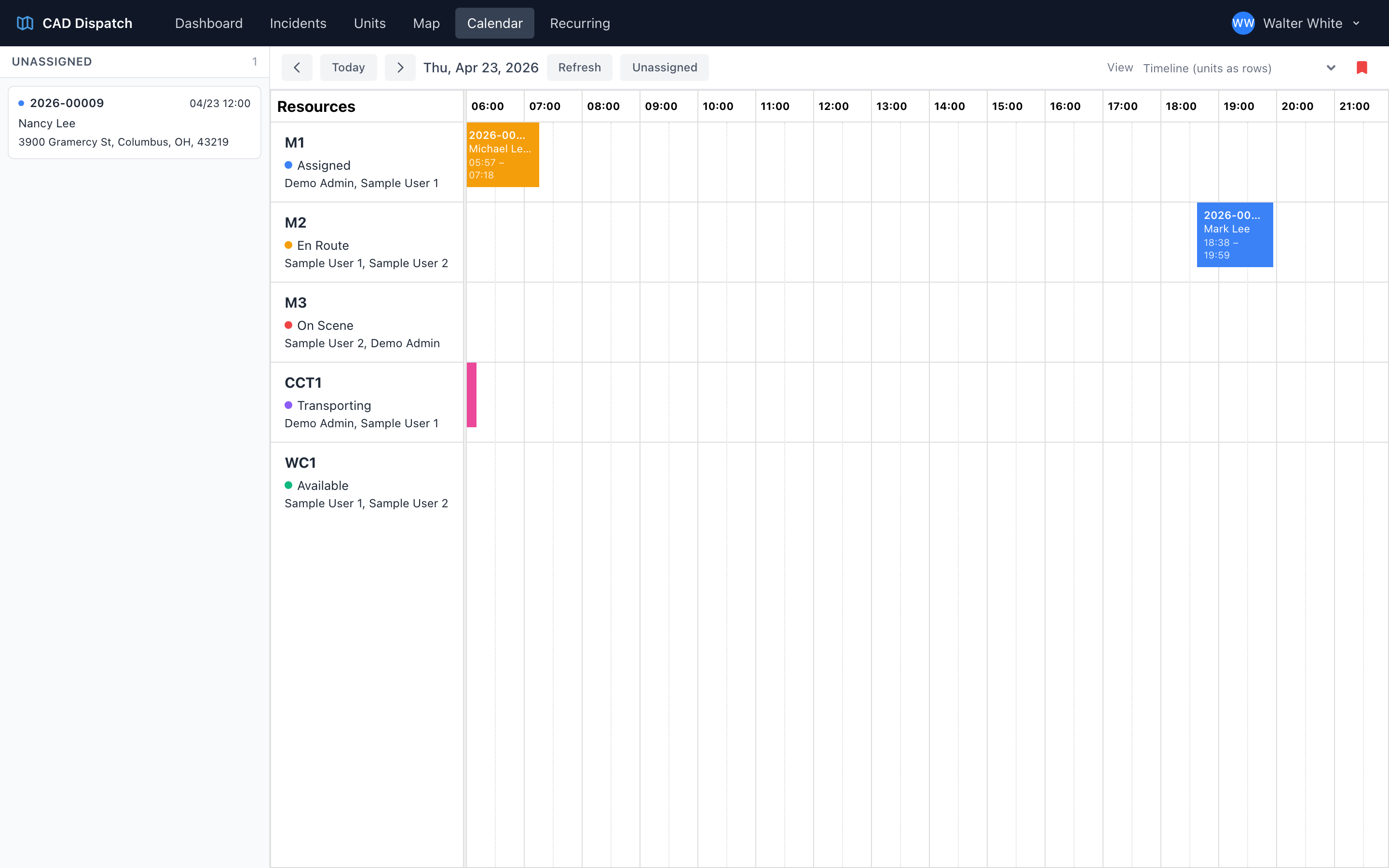
The calendar is your visual timeline for the day. Your active units are rows, and time runs across the top. Scheduled incidents show up as colored blocks in the right time slot on the right unit's row.
Each block shows the incident number and patient name, and the color tells you the status at a glance.
The unassigned panel
A panel on the left of the calendar lists incidents that have not been assigned to a unit yet. Each card shows the incident number, date, time, patient name, and scene address. A count badge tells you how many unassigned incidents you have.
Getting around
- Previous / Today / Next buttons in the toolbar move you through days.
- Refresh reloads the calendar.
- Unassigned toggles the unassigned panel on the left.
Switching the view
A view selector in the toolbar changes how the day is laid out:
- Timeline — units as rows with time running across the top (the default).
- Time Grid — units as columns with time running down the side.
- Utilization — a summary of how busy each unit is.
Click the star (Save as default view) to make your chosen view the one that opens every time.
Drag and drop
The calendar is built around drag and drop — see Using drag and drop on the calendar for how to assign, reassign, and reschedule incidents visually.